Jimi Wikman
💫 Owner
-
Joined
-
Last visited
Files posted by Jimi Wikman
-
Student:Jimi Wikman
School:Refined Academy
Course:Refined Sites Foundation
Certificate ID:is0j0nky7a
Issued:2025-11-09
Expires:2027-11-09
- 0 Downloads
-
Description:
Enhance your Atlassian documentation with this comprehensive set of 344 high-quality PNG icons designed specifically for Atlassian Assets. Perfect for IT teams, administrators, and asset managers, these icons help you visually represent your Atlassian configuration, infrastructure, and workflows with clarity and consistency.
This icon pack includes a wide range of categories such as:
Servers & Hardware
Applications & Services
Network Components
Cloud & Virtualization
User Roles & Permissions
Key Features:
✔ 344 professionally designed PNG icons
✔ Optimized for Atlassian Assets and CMDB documentation
✔ Ideal for IT asset management, Jira Service Management, and configuration documentation
✔ Based on Font Awesome – usage must comply with Font Awesome’s license and guidelines
Important Notice:
These icons are derived from Font Awesome, so by downloading and using this set, you agree to follow Font Awesome’s usage terms and licensing requirements.
Why Download?
Improve the readability and professionalism of your Atlassian setup documentation. Whether you’re creating asset inventories, network diagrams, or service maps, these icons make your documentation visually appealing and easy to understand.
- 10 Downloads
-
A set of icons based on Fontawesome's fonts and colored based on the area of responsibility as defined here on my website.
You are free to use these icons as you see fit, as long as you follow their License: https://fontawesome.com/license/free
I hope you will find them useful.
- 395 Downloads
- 4 Comments
-
A simple icon set for Priorities I use in my own Jira instance.
It uses colors to indicate priority / Severity ranging from full red in the blocker and then scale down in the color range down to purple for the lowest.
The symbols are simplified as well to make them as visible as possible.
Included:
Blocker - Full red with a blocked icon as the indicator. Highest - 7 sided background in deep red with a white exclamation mark. High - Orange triangle pointing upwards. Medium - Green circle Low - Blue triangle pointing downwards. Lowest - Three purple dashes.- 12 Downloads
- 1 Comments
-
- 13 Downloads
-
This is the template file for showing the Support Tickets records listing, which is also the landing page in this setup.
- 11 Downloads
-
A set of rank icon shapes.
It is the same icon shapes used here on this site, but without symbols.
You can download for free and use as base for your own Rank Icons.
Enjoy!
- 32 Downloads
- 1 Comments
-
A set of Server icons that you can use on your own projects.
For now the files available are:
Shared hosting VPS Dedicated server Cloud hosting Co-location Server Stack Server Stack Cloud Services Feel free to suggest additional icons and I will see what I can do 🙂
- 3 Downloads
-
These are the icons used on this site for 16personalities.
They are color matched with the DISC Icons rather than the standard colors.
Included are both SVG files and PNG files.
Architect Logician Commander Debater Advocate Mediator Protagonist Campaigner Logistican Defender Executive Consul Virtuoso Adventurer Entrepreneur Entertainer- 5 Downloads
-
These are the DISC Icons used of this website.
I have added the images in SVG and PNG format.
D DI DS DC I ID IS IC S SD SI SC C CD CI CS- 3 Downloads
-
This is my version of the classic V-model for test where I have tried to clarify each part a bit as it is sometimes confusing.
I know the V-model is old and it can sometimes confuse people whi think there is a timeline aspect to it.
Still I think it can be useful so I made this one that you are free to use as you see fit.
Enjoy!
- 7 Downloads
-
- 31 Downloads
-
We go over transitional and producing workflows, designing issue types and how to divide projects into a scalable solution that also can be used for SAFe. Stockholm AUG Leader Jimi Wikman show the setup he has built based on his experience as a project leader, release manager, designer, front end developer, requirement analyst and tester. He show his best tricks on what works in small and large scale organizations based on his experiences as a Jira expert.
Prepare for a provocative and inspiring session where we dive into the 4 design principles for a sustainable, flexible and controlled Jira that works.
For real.
- 14 Downloads
-
This is my CV for Project Leader in english.
- 4 Downloads
-
This is my curriculum vitae in Swedish.
- 6 Downloads
-
First name: Jimi Last name: Wikman Date of examination: 2017-02-23 Certificate ID: RE-86432 Level: Foundation Level Permalink: https://www.ireb.org/en/service/cpre-registry-list/4792/
- 1 Downloads
-
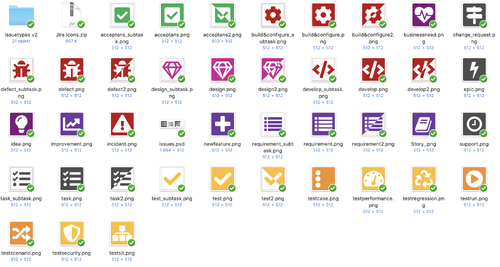
This is the set of icons used for JWSE for Jira Software and Jira Service Desk. It is a simple set created in Sketch using Font Awesome and some manual touches. These icons follow the same color scheme as the JWSE website.
The Icons include:
Epic Idea Business Need Change Request Story Requirement Non-functional Requirement Design Defect Incident Code Build & Configure Technical Debt Task Support Open Question JWSE Specific Icons
Article Jobs People You are free to download and use these icons as long as you abide to the Font Awesome Free License: https://fontawesome.com/license/free
Feel free to suggest new icons and I will consider adding them to this package.
- 72 Downloads
-
This is an internal presentation about how to network. It was presented at Claremont in 2019.
- 0 Downloads
-
- 24 Downloads
-
When working at H&M as the Jira expert I issued Certificates of Excellence to the Gods of Jira team. This one was issued to Bharath Kumar Dhanasekaran for his outstanding work as a Jira expert.
"For performing above and beyond
Awarded for working in a professional way with exceptional dedication
that has been above and beyond just being service minded. It is
also awarded for a positive attitude that is appreciated by
co-workers and clients alike. Finally it is awarded for being
passionate and being active in learning new things in Jira."
- 0 Downloads
-
When working at H&M as the Jira expert I issued Certificates of Excellence to the Gods of Jira team. This one was issued to Praveen Soundarrajan for his outstanding work as a Jira expert.
"For performing above and beyond
Awarded for working in a professional way with exceptional dedication
that has been above and beyond just being service minded. It is
also awarded for a positive attitude that is appreciated by
co-workers and clients alike. Finally it is awarded for being
passionate and being active in learning new things in Jira."
- 0 Downloads
-
When working at H&M as the Jira expert I issued Certificates of Excellence to the Gods of Jira team. This one was issued to Dipayan Kundu for his outstanding work as a Jira expert.
"For performing above and beyond
Awarded for working in a professional way with exceptional dedication
that has been above and beyond just being service minded. It is
also awarded for a positive attitude that is appreciated by
co-workers and clients alike. Finally it is awarded for being
passionate and being active in learning new things in Jira."
- 0 Downloads
-
This is a very old portfolio from back in 2011.
the images are not very good, but it's a nice little spread of my designs from back in the day 🙂
- 21 Downloads
-
A Certified SAFe® 5 Agilist (SA) is a SAFe enterprise leadership professional who is part of a Lean-Agile transformation. Key areas of competency include the application of Lean-Agile principles, execution and release of value through Agile Release Trains (ARTs), and building an Agile portfolio with Lean-Agile budgeting.
- 2 Downloads
-
A simple icon set for Priorities I use in my own Jira instance.
It uses colors to indicate priority / Severity ranging from full red in the blocker and then scale down in the color range down to purple for the lowest.
The symbols are simplified as well to make them as visible as possible.
Included:
Blocker - Full red with a blocked icon as the indicator. Highest - 7 sided background in deep red with a white exclamation mark. High - Orange triangle pointing upwards. Medium - Green circle Low - Blue triangle pointing downwards. Lowest - Three purple dashes.- 180 Downloads
- 3 Comments