


Jimi Wikman
💫 Owner
-
Joined
-
Last visited
-

 Organizations considering Rovo (and generative AI in general) frequently focus on the wrong risk first. The core question isn’t whether AI will provide incorrect results. The core question is whether your internal data is stored, reused, or exposed without your control. Enterprise Gen-AI incidents are going to stem from data governance failures: broad permissions, leaky integrations, unclear retention policies, or hidden sub-processors.
 -
We’re excited to share an update that will help you get even more out of Confluence whiteboards! We’ve increased the limit for Confluence Standard from 3 to 10 active whiteboards per user. What’s changing?New: Confluence Standard is changing from a limit of 3 to now support up to 10 active whiteboards per user. Who is impacted: Confluence Standard users When does this take effect: Immediately
-
We’re excited to announce the next wave of Rovo Dev capabilities, now available in closed beta! Over the past months, your feedback has helped us shape Rovo Dev into a smarter, more connected AI teammate for developers and teams. Today, we’re opening up access to new features that make your workflows even more powerful, contributing even more to other areas of SDLC.
-
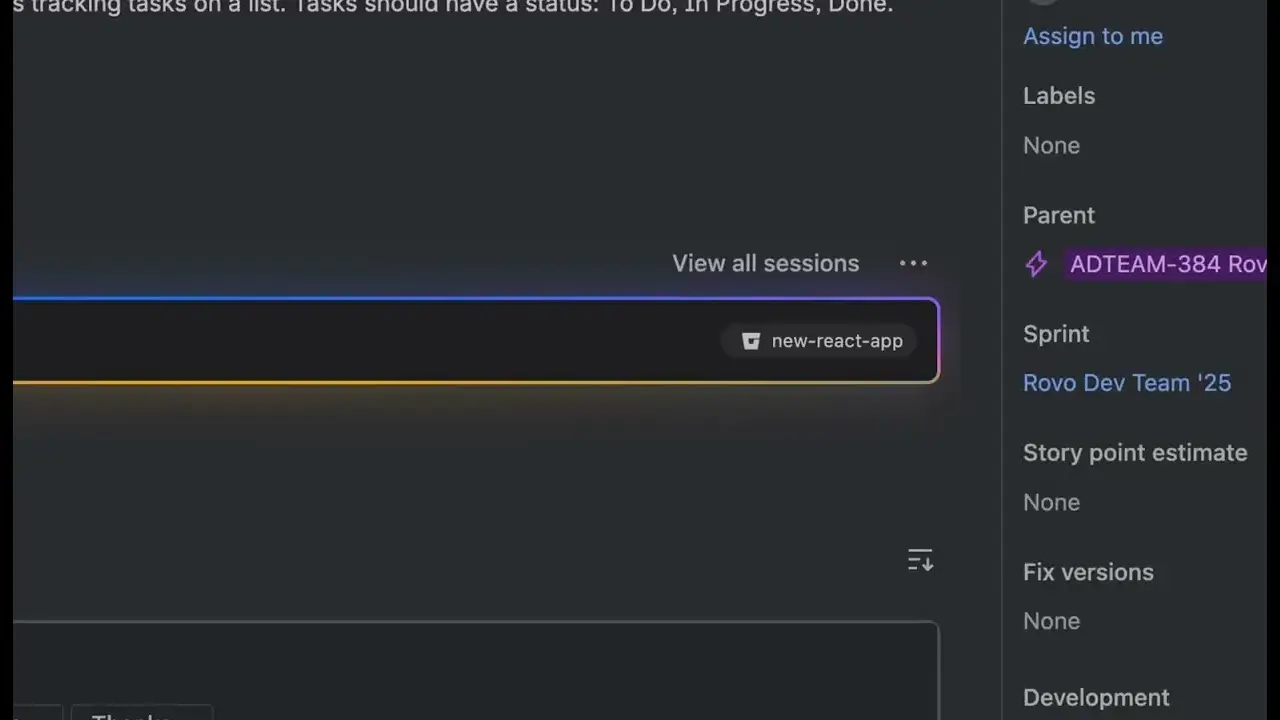 Take your Jira workflows to the next level with AI-powered sessions, now seamlessly integrated with Rovo Dev in the cloud. In this video, we’ll show you how Rovo Dev in Jira transforms the way you manage and deliver work—combining the intelligence of Rovo Dev CLI with the convenience of Jira and the power of your IDE. What’s a Session? Rovo Dev in Jira is a self-contained, AI-driven workflow that helps you tackle Jira work items with unprecedented efficiency. Manage multiple sessions at once, each tailored to your specific tasks, and let the Rovo Dev Agent understand your context, coding standards, and project requirements. Key Highlights: Instantly start Rovo Dev from any Jira work item with a single click Select the right repository and provide custom context for your agent Configure branch names and source branches with ease Generate code, review changes, and iterate, all within a dedicated session Track work item status and see all your sessions, their outputs, and progress in one place Effortlessly create pull requests and see them automatically linked to your Jira work items Interact with the agent: tweak, interrupt, or guide it via chat for maximum control See It in Action: Watch as we walk through a real-world example, starting from a Jira work item, launching a session, generating code, reviewing changes, and creating a pull request. Experience how Rovo Dev brings the power of your IDE to Jira, making your development process smarter and more autonomous. Want to learn more? Check out our full How-To series playlist for more tips and deep dives: • What is Rovo Dev CLI? | Rovo Dev | Atlassian
 -
We’re excited to invite customers to try our new beta experience - Create with Rovo in Jira, a new experience in Jira that uses AI to help you turn ideas, notes, and documents into structured work in just a few steps. Instead of manually converting long specs, meeting notes, or conversations into Jira work items, Create with Rovo helps by generating work item suggestions, which you can refine before you hit “Create”.
-
As part of our ongoing investment in the reliability and scalability of the Assets infrastructure, we’re excited to share that we’ve significantly increased Asset REST API rate limits and are now targeting 99.95% uptime for core Asset UI experiences. These improvements are designed to help you scale with confidence and keep your teams moving forward. This, along with the recent increase in the asset storage limit from 3 million -> 10 million objects, helps deliver consistent and reliable service for managing your organisation’s assets at scale.
-
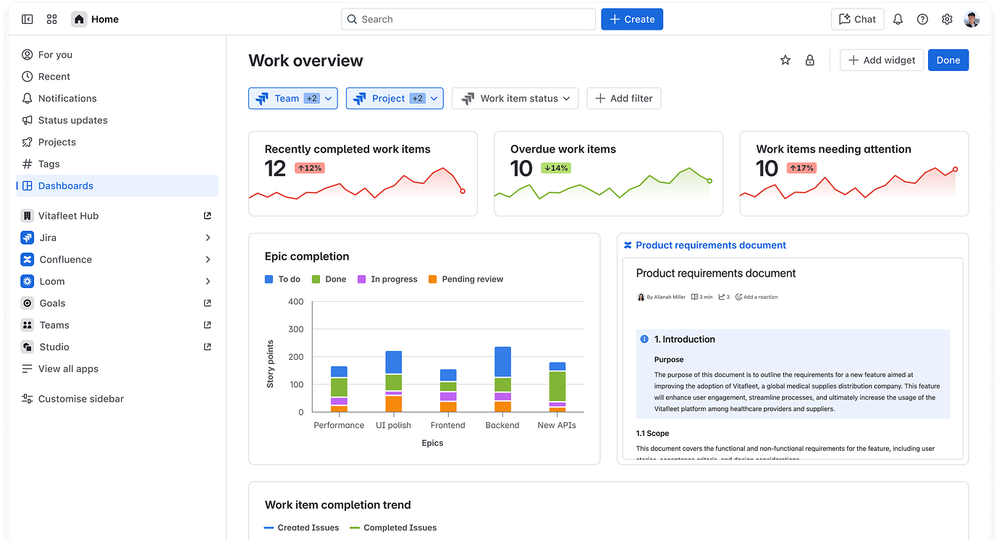 We are excited to announce the addition of 10 more Jira Service Management metrics to the new Dashboards in Atlassian Home. These metrics help you visualize and explore your service data on the dashboards.
 -
We are excited to announce two major enhancements to Atlassian account security: the launch of passkeys as a password alternative and the introduction of support for multiple 2SV (2-step verification) factors. These features are now available to help you secure your Atlassian account with greater flexibility and ease.
-
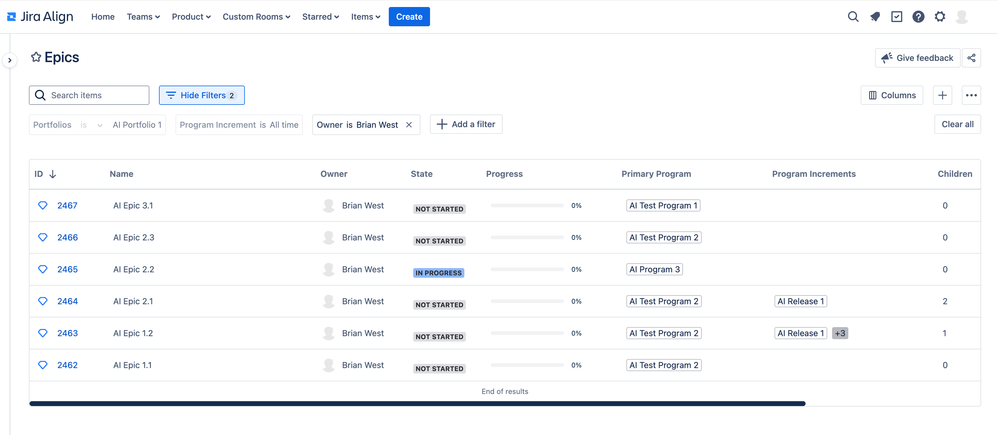 I’m happy to announce the launch of our latest project: a new experience for grid pages in Jira Align. Our first milestone is the beta release of a new Epics grid page. This modernized view for epics is now available for testing in version 11.19. What’s included The new experience provides a faster, more performant grid table. Features in the first release include: A familiar, flexible table: Choose the columns you need and navigate with smooth infinite scroll for large datasets. Redesigned inline filters: Apply precise filters with multiple operators on key fields, with an improved, intuitive UX. Deep links and context: Share filtered views to align stakeholders and drive consistency. Hierarchy support: Work seamlessly at Global, Portfolio, Solution, and Program levels with full navigation context.
 -
We’re excited to announce that Audit Log Query Language (ALQL) is now available for all organization and site admins! What is ALQL?ALQL is a powerful, JQL-inspired query language built into the Audit log. It’s designed to make searching and filtering audit logs easier, faster, and more flexible, no matter how much your organization’s data grows. You can start leveraging this advanced search capability by switching to ALQL mode. The new search mode enables you to create more complex queries with multiple filters (such as date, activity, and actor) using operators like AND, OR, IN, and LIKE. As you create your query, autocomplete suggestions will appear to help craft your queries. With ALQL, you can streamline investigations, fulfill compliance obligations, and uncover deeper insights from your audit log data.
-
Today we show you an exciting upcoming automation tool for all community users. Our own David Jenkins previews DemoRoo. What is DemoRoo?DemoRoo is an Atlassian Forge application designed to automate the customization of One Atlassian demo sites. It integrates with Salesforce and leverages industry-specific templates to streamline the setup and management of demo environments. The app is focused on improving product activation, site management workflows, and data integrity, while also supporting scalability and access controls. Ever need demo data, that's pertinent for an industry for an important demo? And quickly? Use DemoRoo to automates and customizes demo site creation for Atlassian’s internal and partner teams, in industry-specific scenarios. Soon available for everyone in the community!
-
We’re excited to share that the Atlassian Rovo MCP connector for ChatGPT is now officially live. This means you can now bring Jira, Confluence, and Compass context directly into ChatGPT and actually take action on it - all in the flow of conversation.
-
We are creating a new experience in Jira to enable capacity planning at the individual level. The goal of the experience is to enable people managers and team leads to plan capacity of individuals in their team across major work streams and define their allocation against each. These major streams of work can be modelled as Jira epics or higher-level work items. We are working towards a closed EAP with a limited set of features for a few customers by the end of 2025, followed by an Open EAP in April–May 2026. We don’t currently have APIs or UI extension points in Connect or Forge; however, we’re committed to building an extensible experience and plan to provide these extension points in the coming months. We’d love your feedback on how we can provide value to both existing and new apps.
-
We’re thrilled to announce that Forge Automation Actions has reached General Availability (GA)! This feature allows you to extend the Atlassian Automation Platform by building custom Forge-based actions that integrate seamlessly with Jira automation rules. What’s new in GASmart values output — Forge actions can now output smart values, enabling seamless data flow between actions and dynamic automation workflows.
-

until