Skip to content
View in the app

A better way to browse. Learn more.

JimiWikman.se

A full-screen app on your home screen with push notifications, badges and more.

To install this app on iOS and iPadOS
  1. Tap the Share icon in Safari
  2. Scroll the menu and tap Add to Home Screen.
  3. Tap Add in the top-right corner.
To install this app on Android
  1. Tap the 3-dot menu (⋮) in the top-right corner of the browser.
  2. Tap Add to Home screen or Install app.
  3. Confirm by tapping Install.

New Affinity Update | Biggest Changes in Version 3.1

By 💫 Jimi Wikman ·
⏵ Download Affinity: https://www.affinity.studio/
⏵ Free Affinity course: https://courses.affinityrevolution.co...

• • • • • • • • • • • •

In this video, I'll show you the biggest changes in Affinity 3.1 (also labeled as the "March 26 (4231)" update).
Chapters:
0:00 Introduction
0:11 Light Mode
0:45 Home Screen Customization
1:14 Tone Brush
2:08 Convert Selections to Vectors
2:33 Captions
3:45 Pen Tool Improvements
4:41 Document Tab Menu
4:58 Brush Settings
5:14 Edit Gradient Swatches
5:24 Bug Fixes
5:50 How to Download Affinity
    Professional,
  • 0
  • 527

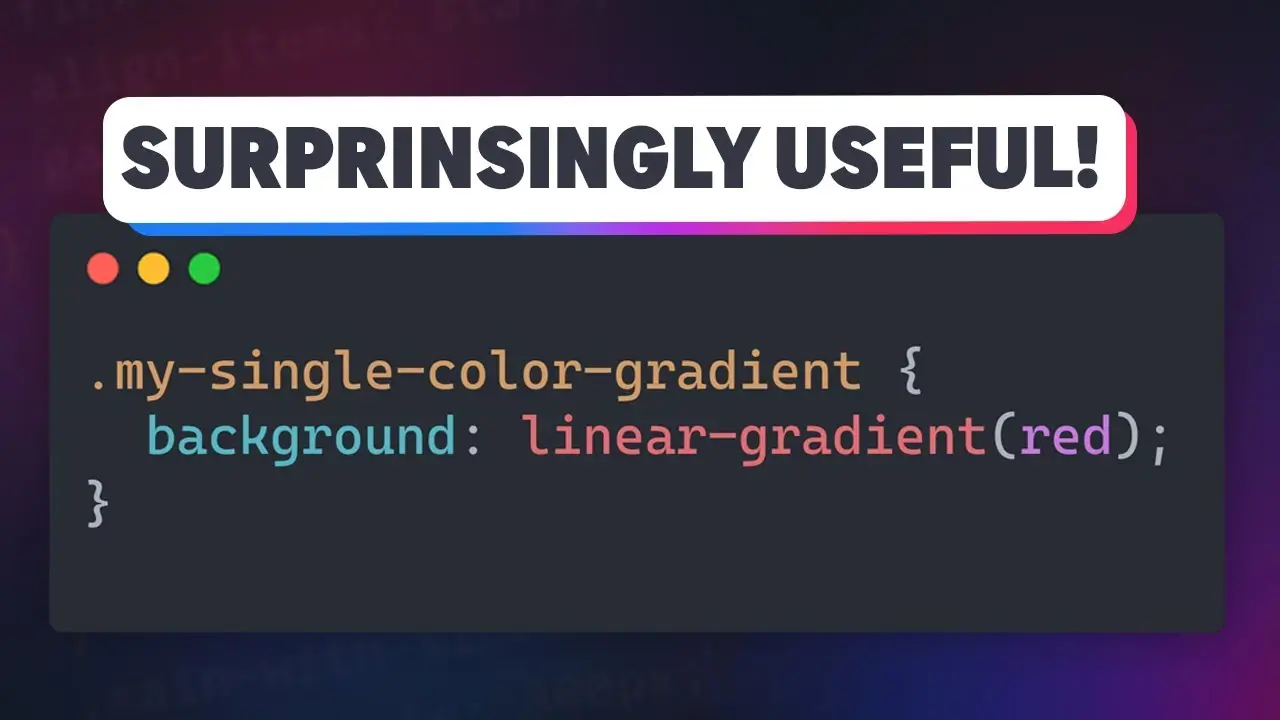
Why I use single-color gradients in my CSS

By 💫 Jimi Wikman ·
🔗 Links
✅ Code from this video: https://codepen.io/kevinpowell/pen/RN...
✉ Keep up to date with everything I'm up to https://www.kevinpowell.co/newsletter
💬 Come hang out with other devs in my Discord Community  / discord  
⭐ Are you a beginner? HTML & CSS for absolute beginners is for you: https://learn.kevinpowell.co
🎓 Start writing CSS with confidence with CSS Demystified: [https://cssdemystified.com](https://cssdemystified.com/)
🚀 Already mastered CSS? Check out my advanced course, Beyond CSS: https://www.beyondcss.dev/

⌚ Timestamps
00:00 - Introduction
00:20 - Creating overlays over background images
02:50 - Gradient borders
06:00 - Bonus tip: animating gradients

---
Help support my channel
👨‍🎓 Get a course: https://www.kevinpowell.co/courses
👕 Buy a shirt: https://cottonbureau.com/people/kevin...
💖 Support me on Patreon:
 / kevinpowell   or through YT memberships:
 / @kevinpowell  
---
🧑‍💻 My editor: VS Code - https://code.visualstudio.com/
🌈 My theme: One Dark Pro Var Night
🔤 My font: Cascadia Code
---
I'm on some other places on the internet too! If you'd like a behind the scenes and previews of what's coming up on my YouTube channel:
Bluesky: https://bsky.app/profile/kevinpowell.co
Codepen: https://codepen.io/kevinpowell/
Github: https://github.com/kevin-powell
---
And whatever you do, don't forget to keep on making your corner of the internet just a little bit more awesome!
    Professional,
  • 0
  • 551

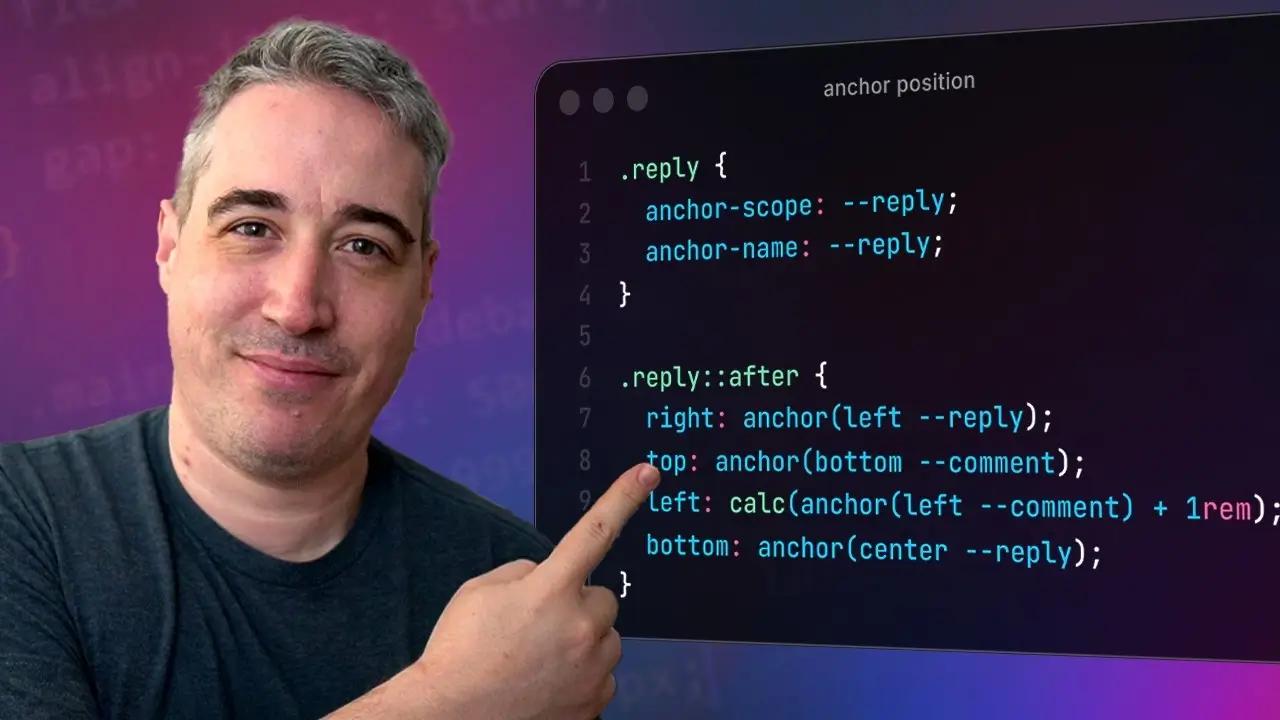
A couple of great anchor positioning use cases

By 💫 Jimi Wikman ·
Anchor positioning is great at a lot more than just tooltips!
🔗 Links
✅ OddBird article I mentioned on fixes for when anchor positioning doesn't work: Here’s Why Your Anchor Positioning Isn’t Working: https://www.oddbird.net/2025/01/29/an...
✅ The nav video I mentioned at the end:  
 Make this fun effect that follows your cur...  
✉ Keep up to date with everything I'm up to https://www.kevinpowell.co/newsletter
💬 Come hang out with other devs in my Discord Community
 / discord  
⭐ Are you a beginner? HTML & CSS for absolute beginners is for you: https://learn.kevinpowell.co
🎓 Start writing CSS with confidence with CSS Demystified: [https://cssdemystified.com](https://cssdemystified.com/)
🚀 Already mastered CSS? Check out my advanced course, Beyond CSS: https://www.beyondcss.dev/ --- Help support my channel 👨‍🎓 Get a course: https://www.kevinpowell.co/courses
👕 Buy a shirt: https://cottonbureau.com/people/kevin...
💖 Support me on Patreon:   / kevinpowell   or through YT memberships:    / @kevinpowell  
---
⌚ Timestamps
00:00 - Introduction
00:45 - Tethering to another element
06:45 - anchor-scope
10:24 - Tethering to more than one element #css
--
🧑‍💻 My editor: VS Code - https://code.visualstudio.com/
🌈 My theme: One Dark Pro Var Night
🔤 My font: Cascadia Code
---
I'm on some other places on the internet too! If you'd like a behind the scenes and previews of what's coming up on my YouTube channel: Bluesky: https://bsky.app/profile/kevinpowell.co Codepen: https://codepen.io/kevinpowell/ Github: https://github.com/kevin-powell --- And whatever you do, don't forget to keep on making your corner of the internet just a little bit more awesome!
    Professional,
  • 0
  • 556

10 NEW CSS Features You Need To Know For 2026

By 💫 Jimi Wikman ·
CSS is getting way more powerful than most people realize. From custom functions and conditionals to zero-JS carousels and scroll logic, here are 10 features you should know for 2026.

🔗 Relevant Links
corner-shape: https://developer.mozilla.org/en-US/docs/Web/CSS/Reference/Properties/corner-shape
shape function: https://developer.mozilla.org/en-US/docs/Web/CSS/Reference/Values/basic-shape/shape
Custom Select: https://developer.mozilla.org/en-US/docs/Learn_web_development/Extensions/Forms/Customizable_select
Scroll Markers: https://developer.mozilla.org/en-US/docs/Web/CSS/Reference/Selectors/::scroll-marker
Scroll State: https://developer.mozilla.org/en-US/docs/Web/CSS/Guides/Conditional_rules/Container_scroll-state_queries
Text Box: https://developer.mozilla.org/en-US/docs/Web/CSS/Reference/Properties/text-box
Sibling Index: https://developer.mozilla.org/en-US/docs/Web/CSS/Reference/Values/sibling-index
if() functions: https://developer.mozilla.org/en-US/docs/Web/CSS/Reference/Values/if
Custom Functions: https://developer.mozilla.org/en-US/docs/Web/CSS/Guides/Custom_functions_and_mixins/Using_custom_functions


❤️ More about us
Radically better observability stack: https://betterstack.com/
Written tutorials: https://betterstack.com/community/
Example projects: https://github.com/BetterStackHQ

📱 Socials
Twitter: / https://x.com/betterstackhq
Instagram: / https://www.instagram.com/betterstackhq/
TikTok: / https://www.tiktok.com/@betterstack
LinkedIn: / https://www.linkedin.com/company/betterstack/

📌 Chapters:
0:00 Intro
0:13 corner-shape
0:48 shape function
1:44 Custom Selects
2:24 scroll-marker
3:12 scroll-state
4:26 stretch
5:05 text-box
6:31 sibling-index
7:10 if function
7:58 Custom Functions
    Professional,
  • 0
  • 720

We Studied 150 Developers Using AI (Here’s What's Actually Changed...)

By 💫 Jimi Wikman ·
AI coding tools like Claude Code, GitHub Copilot, Cursor, and ChatGPT are changing how we write software — but are they actually improving long-term software quality, or just accelerating slop?
In this episode of Modern Software Engineering, Dave Farley explores the real impact of coding with AI, drawing on published research into human vs AI code maintainability. We look at what happens after the AI has written the code — when the next developer needs to understand, change, refactor, and maintain it.
You’ll learn:
Whether AI programming actually harms or helps maintainability
Practical Claude Code tips and insights into how Claude Code agents influence developer productivity
The truth behind vibe coding — including what is vibe coding and where it helps (or hurts)
Why AI vs human debates miss the real issue: engineering skill and design thinking
How AI can amplify good practices — or accelerate bad ones
What serious software engineers should focus on in the age of artificial intelligence
This video goes beyond how to use Claude Code and dives into what actually matters in software development: maintainability, design quality, decomposition, and long-term engineering discipline.
    Interesting,
  • 0
  • 714

Complete Beginners Guide To Affinity 2025 🔥

By 💫 Jimi Wikman ·
This tutorial provides a complete introduction to Affinity 2025, ideal for beginners. The video covers essential tools, from creating custom workspaces to manipulating shapes and applying live effects. Explore the versatile "Studios" feature to tailor your design experience.
    Professional,
  • 0
  • 1155

My Latest Videos

Account

Navigation

Search

Search

Configure browser push notifications

Chrome (Android)
  1. Tap the lock icon next to the address bar.
  2. Tap Permissions → Notifications.
  3. Adjust your preference.
Chrome (Desktop)
  1. Click the padlock icon in the address bar.
  2. Select Site settings.
  3. Find Notifications and adjust your preference.