


Jimi Wikman
-
Joined
-
Last visited
Posts posted by Jimi Wikman
-
-
As Atlassian is moving further into the AI domain, we can clearly see that they are moving more and more towards generative content. This is expected, but what will that mean for things in how we, as Administrators, will work in the platform?
The Teamwork Graph is now front and center to provide context to AI generative content, so how do we, as Admins, work to ensure quality of data and define strategies so we can govern and direct the users so that data is generated towards something that is useful for the organizations?
This will be an important part of the book, so I will need to adjust some parts to bring this in.
-
I find that this works quite well if you want to get a cout of the number of objects in a database:
({expression="\IPS\Db::i()->select('COUNT(*)', 'cms_custom_database_49', ['record_approved=?', 1])->first()"})Just replace the ID in the cms_custom_database_49 with the ID of the database you want to get the number of objects from.
-
I have never used the discovery tool myself, so I can't give you hands-on experience there :)
Based on the information on the Atlassian website (not sure if that is accurate or not), there are certain base attributes the discovery tool fetches, and then you can extend that using Pattern settings.
The data should be mapped the same way as when you do a CSV import. So you can have multiple mappings in the import, so you import devices, users, and network objects to different object types or even schemas. In the mapping, you can set object mappings if your attribute is an object linked to another object type in the same object schema or another one.
-
 1
1
-
-

I created a new work item and set up some automations, but I could not set the Summary for the new work items having the new work item type. Turns out that Summary is no longer added automatically to all screens, so the summary was in the screen, but not editable.
That is going to be annoying very quickly, so is it a bug or a feature?
-
If you are trying to figure out how to find those request type groups now that Atlassian is hiding them, this might help.
When you are in Jira Service Management, right-click and choose inspect, then go to the console tab. You can also press F12 to get there directly.
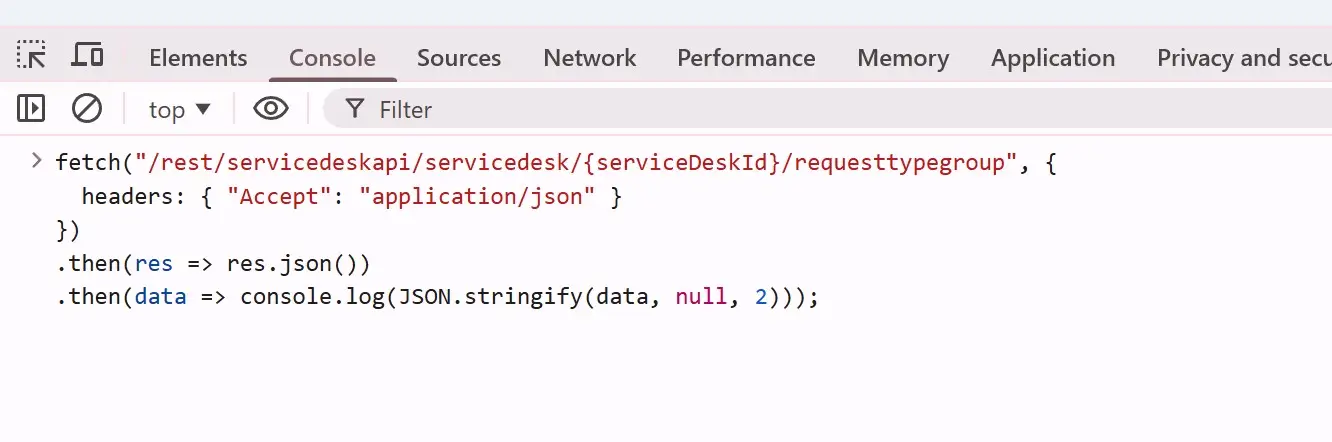
When you are in the console, paste this code. Add the Jira Space ID that you can find if you go to the portal and look at the URL, or you can see it under the channels for the Jira Service Management space.
 fetch("/rest/servicedeskapi/servicedesk/{serviceDeskId}/requesttypegroup", {
  headers: { "Accept": "application/json" }
})
.then(res => res.json())
.then(data => console.log(JSON.stringify(data, null, 2)));
Run the script, and you should have a nice output of the request type groups for that Jira Service Management space.
-
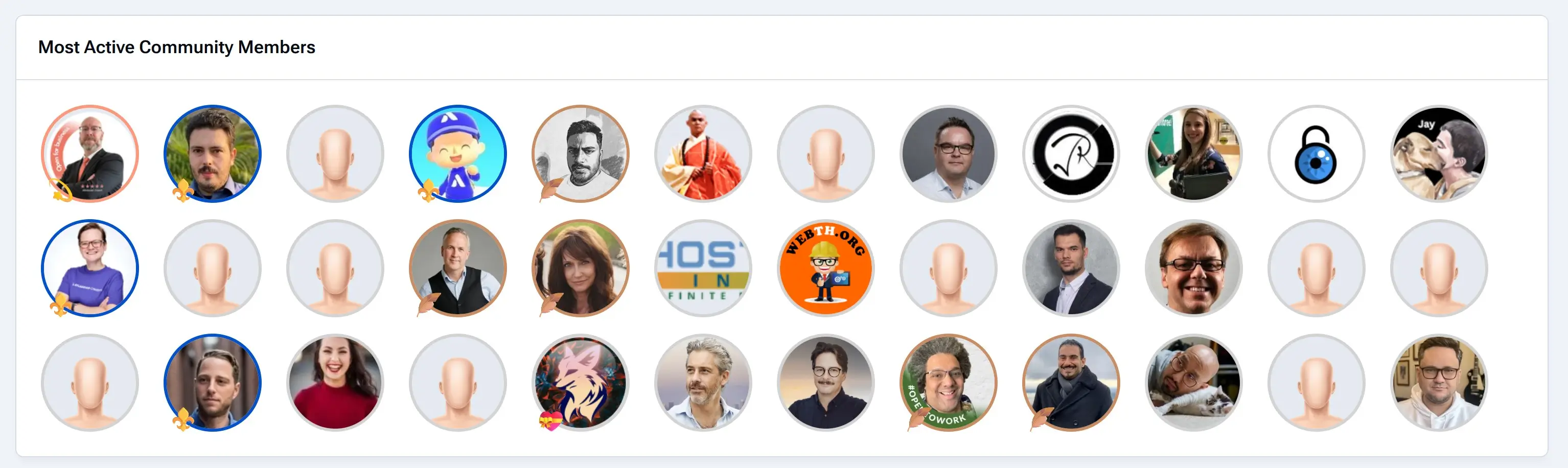
On my main page right now, I have a block that shows the most active community members. This is a block you can make yourself in just a few minutes, but it requires a little tweak in the template. By default, this plugin block shows the output with linked names of the users and not the avatars.
To create a block like this, you go to Pages -> Blocks and click to create a new block.
Next, select Plugin as the type and select Members as the source of your data. Make any configuration to the data, and then if you save this, you will have a nice list of named links showing members based on your configuration.
The final step is to change the template so we get the avatars instead. In the content section, where you select the templat,e change the second dropdown from "Use this template as-is" to "Use as a base for a new template". Then you can edit the template so it fits what you want the output to be.
This is what my template looks like, as it includes some CSS to style the avatars based on their usergroup as well.
<h3 class='ipsWidget__header'> {$title} </h3> {{if $display === 'csv'}} <div class='ipsWidget__content ipsWidget__padding'> {{if count($members)}} <ul class='ipsList ipsList--inline ipsList--grid' style=" gap: 1rem 1.5rem;"> {{foreach $members as $row}} {{ $member = \IPS\Member::load($row->member_id); }} <li class='ipsGrid_span3 jwseMember_group jwseMember_group-{$member->group['g_id']}' data-group="{$member->group['name']}"> <a href='{url="app=core&module=members&controller=profile&id={$row->member_id}" seoTemplate="profile" seoTitle="$row->members_seo_name"}' title="{$row->name}" data-ipsHover> {template="userPhoto" group="global" app="core" params="$member, 'medium'"} </a> </li> {{endforeach}} </ul> {{else}} <p class='ipsEmptyMessage'>{lang="widget_members_no_results"}</p> {{endif}} </div> {{else}} <!-- Keep your existing detailed view code here --> {{endif}}My CSS, in case you want to copy it for your own template. I place this inside a style tag in the template itself.
@media screen and (min-width: 480px) {
.jwseMember_group .ipsUserPhoto {
    border: 3px solid lightgrey;
    position: relative;
    overflow: visible; /* Allows pseudo-element to go outside */
    width: 6rem;
}

.jwseMember_group-4 .ipsUserPhoto{
    border-color: #FD987A;
}

.jwseMember_group-4 .ipsUserPhoto::before {
    content: "";
    position: absolute;
    bottom: -10px; /* Move outside */
    left: 0px;   /* Move outside */
    z-index: 1;
    font-size: 24px;
}

.jwseMember_group-18 .ipsUserPhoto{
    border-color: #227D9B;
}

.jwseMember_group-18 .ipsUserPhoto::before {
    content: "";
    position: absolute;
    bottom: -10px; /* Move outside */
    left: 0px;   /* Move outside */
    z-index: 1;
    font-size: 24px;
}

.jwseMember_group-19 .ipsUserPhoto::before {
    content: "";
    position: absolute;
    bottom: -10px; /* Move outside */
    left: 0px;   /* Move outside */
    z-index: 1;
    font-size: 24px;
}

.jwseMember_group-21 .ipsUserPhoto{
    border-color: #CA8C62;
}

.jwseMember_group-21 .ipsUserPhoto::before {
    content: "";
    position: absolute;
    bottom: -10px; /* Move outside */
    left: 0px;   /* Move outside */
    z-index: 1;
    font-size: 24px;
}

.jwseMember_group-28 .ipsUserPhoto{
    border-color: #0052CC;
}

.jwseMember_group-28 .ipsUserPhoto::before {
    content: "";
    position: absolute;
    bottom: -10px; /* Move outside */
    left: 0px;   /* Move outside */
    z-index: 1;
    font-size: 24px;
}

.jwseMember_group-29 .ipsUserPhoto::before {
    content: "";
    position: absolute;
    bottom: -10px; /* Move outside */
    left: 0px;   /* Move outside */
    z-index: 1;
    font-size: 24px;
}
}
I hope this will be useful for you and that you can use it in some way to build even better solutions for your own website.
-
From what I can see, the only way we can have something like this is to use the permissions to restrict who can publish new pages and changes.
This would be to have users without the Create content and the Edit content permissions (in the new role-based permissions). Doing this would require that we create a new role, and it only works if we have all the content in the space to require review for publication.
Doing this would allow a user to create a page or edit it, but not to publish.
It would be great with a publishing workflow in Confluence for audit purposes, but also for things like publications and approvals. I think that is why we have so many marketplace apps for workflows and approvals?
-

One of the most requested features from my clients is the ability to approve new pages or edits to existing pages. While there are plenty of marketplace apps for this, my question is whether this can actually be done with some creativity in Confluence without marketplace apps?
To take this to the next level, is it also possible to do it with appropriate audit trails so it can pass an actual audit?
-
Imagine if you could create a linked ticket directly from inside an Asset object, and you get a popup right there to create it? I know not all projects might have a custom field to link them, but maybe we can add detectors for other things...Like adding native functionality to link asset objects without having to use a custom field?
For the button, the use case would be if you are working with the data in assets and realise that there is an activity you need to do for an asset, then you don't have to leave to a space to log that ticket.
It can be, for example, if you are working with networks, for example, where you realise that one of your routers should be replaced soon, so you want to add a purchase order, or maybe you realize that the current architecture needs a restructure, so you want to add an architect task. Perhaps you just want to add a documentation task to something (and yes, having Confluence links open up in the sidebar would be AWESOME!)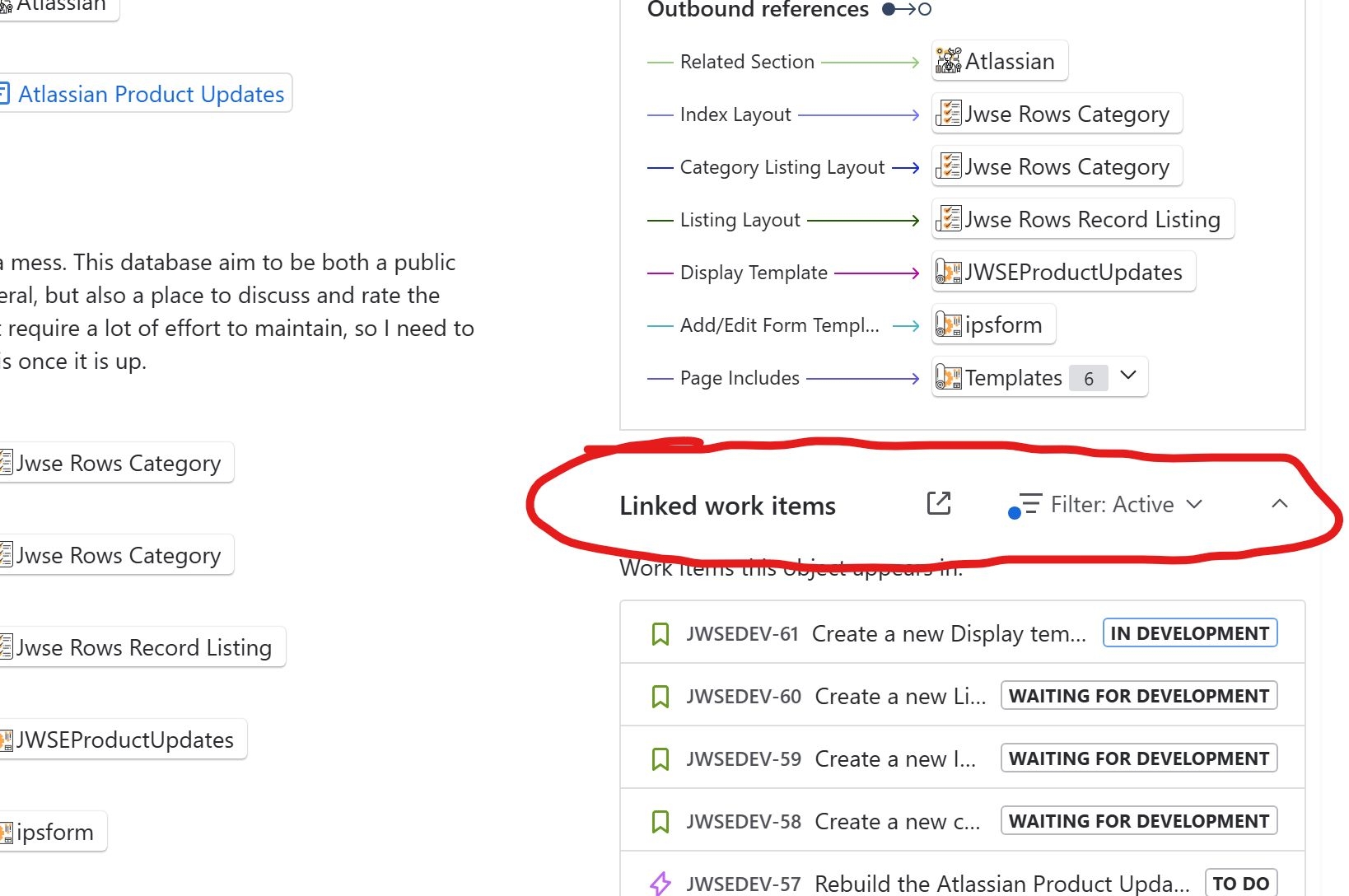
-
Assets has a lot of limitations, which is difficult to know as it is not listed anywhere except for a single support page:
https://support.atlassian.com/assets/docs/how-much-data-can-you-store-in-assets/Assets is a database and so requires a combination of good data modelling and a great deal of processing power to handle large amounts of data.
For this reason, there are limitations on how many objects, attributes, and attribute characters can be stored inside schemas within each individual Assets site. Exceeding these limits can cause performance and reliability issues, therefore each site cannot create further items once they reach the limit.
Usage limits do apply to Assets. Premium customers get up to 50,000 objects included as part of their plan, and Enterprise customers get up to 500,000 objects. What is usage and how it works.
The limitations are as follows:
Feature type
Context
Limit
Maximum number of schema objects across assets
Global
10 million
Total number of schema objects in Services schema
Schema
20,000
Total number of schemas
Global
100
Maximum number of objects per object type
Object type
2 million
Maximum total attributes per object type
Object type
120
Total unique constraints per object type
Object type
2
Total URL, Email, and Select attributes maximum cardinality
Object
50
Total URL, Email, and Select attributes maximum combined characters across all values
Object
2,700
Total TextArea attribute characters
Object
10,000
Maximum Text attribute characters
Object
255
Maximum cardinality in an attribute
Object
20,000
Maximum import file size
Schema
250 MB
-
This isn't as straightforward as it is in DC because we can't use a custom field in AQL as a reference, and we can't use the organization's value (which is a custom field), so I do not think this can be done without having your customers in Assets.
If you have your customers in assets, then you can use the reporter's email and show their assets as I show in this video:
I take it having your customers in Assets is not really an option?
-
18 minutes ago, Daniele Mirabella said: Hi Jimi, I tried to follow the step-by-step configuration identical to the use case, but I'm still having trouble validating the AQL. I think ${customer.blablabl} is causing the problem. I glanced at the documentation and it seems that it's not supported as a smart value in the cloud. I'll run some more tests today, but it may be that this use case can't be satisfied. Could you kindly confirm this for me?
Here documentation ( Filter using a system field: customer is not in the table): https://support.atlassian.com/assets/docs/configure-the-assets-object-field/
You are right, the customer object is only available in an automation :)
I probably should not give you unverified AQL when I am sick, so let me set this up and verify so I don't waste more of your time.
It should probably use something like issue.organizations.name, but if we use something likeobjectType = "Asset" AND Organization IN ( objectType = "Organization" AND Name IN ({{#issue.organizations}}{{name}},{{/issue.organizations}}) )...then it will give us an array, which we need to break down so we can make multiple matches...
I'll set this up in my Assets and get back to you as soon as my head clears a bit with something that works :) -
Welcome @Daniele Mirabella :)
Let us first start with what you are trying to fetch.
If I understand correctly, you want to show Assets, not the organizations, correct?
The steps would be to show all Assets based on the user, and then we want to filter to show only the assets that correspond to the organizations the users belong to.
Object Schema - This is in your example, Organizations
Objecttype = "Assets" - This fetches the data from your Assets, as I assume these are the items you want to show?
AND "Organization" IN (objectType = "Organization" AND Name IN (${customer.organizations}) - This requires you to have an attribute in Assets called Organization that maps to the Organization Objecttype. In that attribute, we look for objects that match the organizations the user belongs to in the variable (${customer.organizations}).
Let me know if that helps. I'll see if I can set this up and verify it for you, as sometimes the queries are not as logical as I think :)
-
I got this question from danmir123 on my YouTube video: https://www.youtube.com/watch?v=tXtLGocPpDs&lc=UgzR_QWLYRJG2zL9X1J4AaABAg
I have a somewhat complex question. I would like to add the asset field to my portal. External customers are all mapped within organizations, which in turn are mapped to assets. Is there a way to use AQL filters to show customers only values related to the assets belonging to their organizations? For example: I have Nintendo, Sony, and Apple. I have these three different objects in my assets. Would a Nintendo customer only see the children within Nintendo, such as “console type”?
Technically, this should be possible using something like this:
objectType = "Asset" AND "Organization" IN (objectType = "Organization" AND Name IN (${customer.organizations})This should fetch the users' Organizations and match them against the Assets objects that match. If a user belongs to more than one organization, then they would see all assets for all organizations.
I have not tested it, but it should work :)
-
If you like me have struggled to get custom emojis to work, then this is a quick fix until they solve it permanently.
Currently, custom emojis are not aligned and there seems to be a bug that does not scale your images, and they somehow get stuck with the previous size and a bunch of other weird things.
I have solved this by adding a CSS to my theme settings and then I brute forced in SVG files rather than PNG.
.ipsEmoji img {
    vertical-align: sub;
    width: 20px;
    height: 20px;
}
This is an ugly fix, but it works, as you can see from these emojis


 .
. -
-
1 hour ago, Cass Fitzgerald said: In addition to the content I think will already be in place, such as best practices and tips, I'm hoping to see real-life case studies and examples showing how admins handle day-to-day work (how they organize their own work), guidance on scaling the Atlassian suite, and potential career paths within companies and possibly within Atlassian.
Those are some great suggestions!
I do have some real life examples in the book, but I will add some more for sure. Career paths I have as that is important and I try to combine that with the many different role names to get some form of base progression path. -
1 hour ago, Cass Fitzgerald said: My company has recently added DX to our Engineering platform. The main benefit is the reporting (if connected to Jira) is a very straight-forward 'click n play' atmosphere, however what people don't realize is the data that comes from DX doesn't usually match the data you get from Jira, and I try to enforce that Jira is the source of truth. That being said, one thing DX does well is it's surveying capacity. Leadership sends out pulse surveys to the engineering department that are very detailed and informing if created correctly.
Great information!
I would assume that when Atlassian acquire DX and integrate it into their products, this should be a lot more accurate.
Thank you for the information Cass, it is good to have someone with first-hand knowledge of DX :) -
-
-
-
-
-
Learn how to deliver exceptional customer support with Jira Service Management. This playlist covers everything from setting up Customer Service Management (CSM) projects to automating workflows, managing SLAs, and improving customer experience. Perfect for support teams and Jira admins looking to streamline service operations.
https://www.youtube.com/playlist?list=PLGnEN5_EhqyYp6nxBDmZY6Srif5xJgI_P


The New Atlassian - Atlassian Team 26 and the new AI focus
in Open discussions for The Advanced Atlassian Administration Guidebook
I will add a new section to the strategy section for Data Strategy and a section under Roles for AI as an important part for admins to invest time into.