If you are trying to figure out how to find those request type groups now that Atlassian is hiding them, this might help.
When you are in Jira Service Management, right-click and choose inspect, then go to the console tab. You can also press F12 to get there directly.
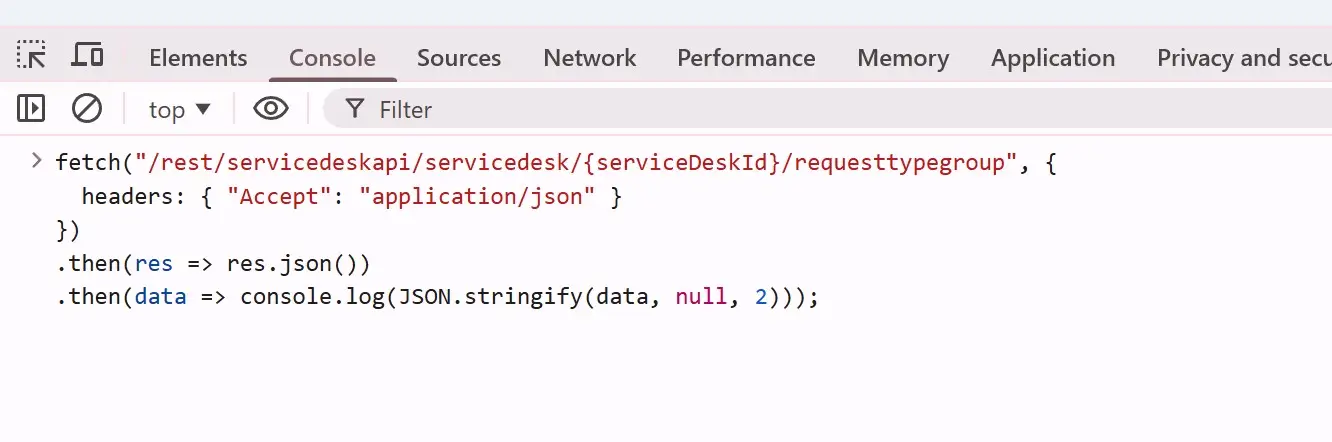
When you are in the console, paste this code. Add the Jira Space ID that you can find if you go to the portal and look at the URL, or you can see it under the channels for the Jira Service Management space.


If you are trying to figure out how to find those request type groups now that Atlassian is hiding them, this might help.
When you are in Jira Service Management, right-click and choose inspect, then go to the console tab. You can also press F12 to get there directly.
When you are in the console, paste this code. Add the Jira Space ID that you can find if you go to the portal and look at the URL, or you can see it under the channels for the Jira Service Management space.
Run the script, and you should have a nice output of the request type groups for that Jira Service Management space.