Skip to content
View in the app

A better way to browse. Learn more.

JimiWikman.se

A full-screen app on your home screen with push notifications, badges and more.

To install this app on iOS and iPadOS
  1. Tap the Share icon in Safari
  2. Scroll the menu and tap Add to Home Screen.
  3. Tap Add in the top-right corner.
To install this app on Android
  1. Tap the 3-dot menu (⋮) in the top-right corner of the browser.
  2. Tap Add to Home screen or Install app.
  3. Confirm by tapping Install.

Building a Members block with avatars

  • Owner

Skärmbild 2026-02-06 143241.webp

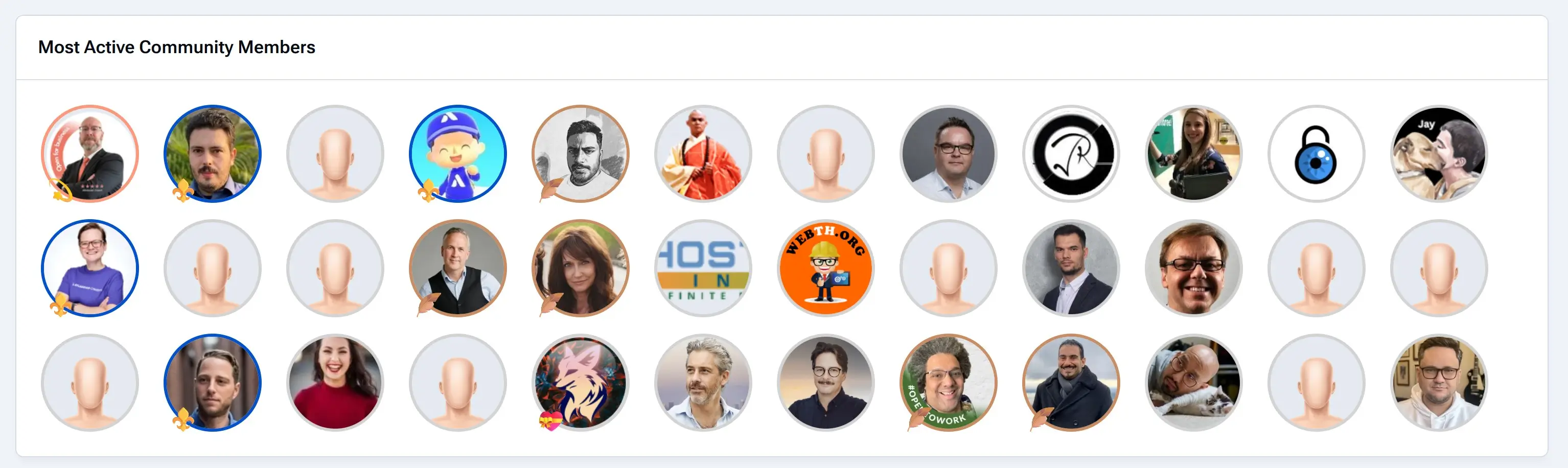
On my main page right now, I have a block that shows the most active community members. This is a block you can make yourself in just a few minutes, but it requires a little tweak in the template. By default, this plugin block shows the output with linked names of the users and not the avatars.

To create a block like this, you go to Pages -> Blocks and click to create a new block.

Next, select Plugin as the type and select Members as the source of your data. Make any configuration to the data, and then if you save this, you will have a nice list of named links showing members based on your configuration.

The final step is to change the template so we get the avatars instead. In the content section, where you select the templat,e change the second dropdown from "Use this template as-is" to "Use as a base for a new template". Then you can edit the template so it fits what you want the output to be.

This is what my template looks like, as it includes some CSS to style the avatars based on their usergroup as well.

<h3 class='ipsWidget__header'>
    {$title}
</h3>
{{if $display === 'csv'}}
    <div class='ipsWidget__content ipsWidget__padding'>
        {{if count($members)}}
            <ul class='ipsList ipsList--inline ipsList--grid' style=" gap: 1rem 1.5rem;">
                {{foreach $members as $row}}
                    {{ $member = \IPS\Member::load($row->member_id); }}
                    <li class='ipsGrid_span3 jwseMember_group jwseMember_group-{$member->group['g_id']}' data-group="{$member->group['name']}">
                        <a href='{url="app=core&amp;module=members&amp;controller=profile&amp;id={$row->member_id}" seoTemplate="profile" seoTitle="$row->members_seo_name"}'
                           title="{$row->name}"
                           data-ipsHover>
                            {template="userPhoto" group="global" app="core" params="$member, 'medium'"}
                        </a>
                    </li>
                {{endforeach}}
            </ul>
        {{else}}
            <p class='ipsEmptyMessage'>{lang="widget_members_no_results"}</p>
        {{endif}}
    </div>
{{else}}
    <!-- Keep your existing detailed view code here -->
{{endif}}

My CSS, in case you want to copy it for your own template. I place this inside a style tag in the template itself.

@media screen and (min-width: 480px) {
.jwseMember_group .ipsUserPhoto {
    border: 3px solid lightgrey;
    position: relative;
    overflow: visible; /* Allows pseudo-element to go outside */
    width: 6rem;
}

.jwseMember_group-4 .ipsUserPhoto{
    border-color: #FD987A;
}

.jwseMember_group-4 .ipsUserPhoto::before {
    content: "";
    position: absolute;
    bottom: -10px; /* Move outside */
    left: 0px;   /* Move outside */
    z-index: 1;
    font-size: 24px;
}

.jwseMember_group-18 .ipsUserPhoto{
    border-color: #227D9B;
}

.jwseMember_group-18 .ipsUserPhoto::before {
    content: "";
    position: absolute;
    bottom: -10px; /* Move outside */
    left: 0px;   /* Move outside */
    z-index: 1;
    font-size: 24px;
}

.jwseMember_group-19 .ipsUserPhoto::before {
    content: "";
    position: absolute;
    bottom: -10px; /* Move outside */
    left: 0px;   /* Move outside */
    z-index: 1;
    font-size: 24px;
}

.jwseMember_group-21 .ipsUserPhoto{
    border-color: #CA8C62;
}

.jwseMember_group-21 .ipsUserPhoto::before {
    content: "";
    position: absolute;
    bottom: -10px; /* Move outside */
    left: 0px;   /* Move outside */
    z-index: 1;
    font-size: 24px;
}

.jwseMember_group-28 .ipsUserPhoto{
    border-color: #0052CC;
}

.jwseMember_group-28 .ipsUserPhoto::before {
    content: "";
    position: absolute;
    bottom: -10px; /* Move outside */
    left: 0px;   /* Move outside */
    z-index: 1;
    font-size: 24px;
}

.jwseMember_group-29 .ipsUserPhoto::before {
    content: "";
    position: absolute;
    bottom: -10px; /* Move outside */
    left: 0px;   /* Move outside */
    z-index: 1;
    font-size: 24px;
}
}

I hope this will be useful for you and that you can use it in some way to build even better solutions for your own website.

  • Views 539
  • Created
  • Last Reply

Posted Images

Featured Replies

No posts to show

Create an account or sign in to comment

Account

Navigation

Search

Search

Configure browser push notifications

Chrome (Android)
  1. Tap the lock icon next to the address bar.
  2. Tap Permissions → Notifications.
  3. Adjust your preference.
Chrome (Desktop)
  1. Click the padlock icon in the address bar.
  2. Select Site settings.
  3. Find Notifications and adjust your preference.