Atlassian
Downloads related to Atlassian.
5 files
-
Description:
Enhance your Atlassian documentation with this comprehensive set of 344 high-quality PNG icons designed specifically for Atlassian Assets. Perfect for IT teams, administrators, and asset managers, these icons help you visually represent your Atlassian configuration, infrastructure, and workflows with clarity and consistency.
This icon pack includes a wide range of categories such as:
Servers & Hardware
Applications & Services
Network Components
Cloud & Virtualization
User Roles & Permissions
Key Features:
✔ 344 professionally designed PNG icons
✔ Optimized for Atlassian Assets and CMDB documentation
✔ Ideal for IT asset management, Jira Service Management, and configuration documentation
✔ Based on Font Awesome – usage must comply with Font Awesome’s license and guidelines
Important Notice:
These icons are derived from Font Awesome, so by downloading and using this set, you agree to follow Font Awesome’s usage terms and licensing requirements.
Why Download?
Improve the readability and professionalism of your Atlassian setup documentation. Whether you’re creating asset inventories, network diagrams, or service maps, these icons make your documentation visually appealing and easy to understand.
- 8 Downloads
-
A set of icons based on Fontawesome's fonts and colored based on the area of responsibility as defined here on my website.
You are free to use these icons as you see fit, as long as you follow their License: https://fontawesome.com/license/free
I hope you will find them useful.
- 389 Downloads
- 4 Comments
-
A simple icon set for Priorities I use in my own Jira instance.
It uses colors to indicate priority / Severity ranging from full red in the blocker and then scale down in the color range down to purple for the lowest.
The symbols are simplified as well to make them as visible as possible.
Included:
Blocker - Full red with a blocked icon as the indicator. Highest - 7 sided background in deep red with a white exclamation mark. High - Orange triangle pointing upwards. Medium - Green circle Low - Blue triangle pointing downwards. Lowest - Three purple dashes.- 12 Downloads
- 1 Comments
-
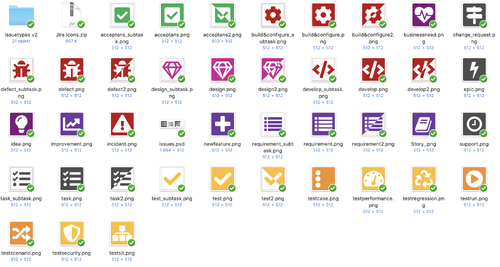
This is the set of icons used for JWSE for Jira Software and Jira Service Desk. It is a simple set created in Sketch using Font Awesome and some manual touches. These icons follow the same color scheme as the JWSE website.
The Icons include:
Epic Idea Business Need Change Request Story Requirement Non-functional Requirement Design Defect Incident Code Build & Configure Technical Debt Task Support Open Question JWSE Specific Icons
Article Jobs People You are free to download and use these icons as long as you abide to the Font Awesome Free License: https://fontawesome.com/license/free
Feel free to suggest new icons and I will consider adding them to this package.
- 70 Downloads
-
A simple icon set for Priorities I use in my own Jira instance.
It uses colors to indicate priority / Severity ranging from full red in the blocker and then scale down in the color range down to purple for the lowest.
The symbols are simplified as well to make them as visible as possible.
Included:
Blocker - Full red with a blocked icon as the indicator. Highest - 7 sided background in deep red with a white exclamation mark. High - Orange triangle pointing upwards. Medium - Green circle Low - Blue triangle pointing downwards. Lowest - Three purple dashes.- 178 Downloads
- 3 Comments